

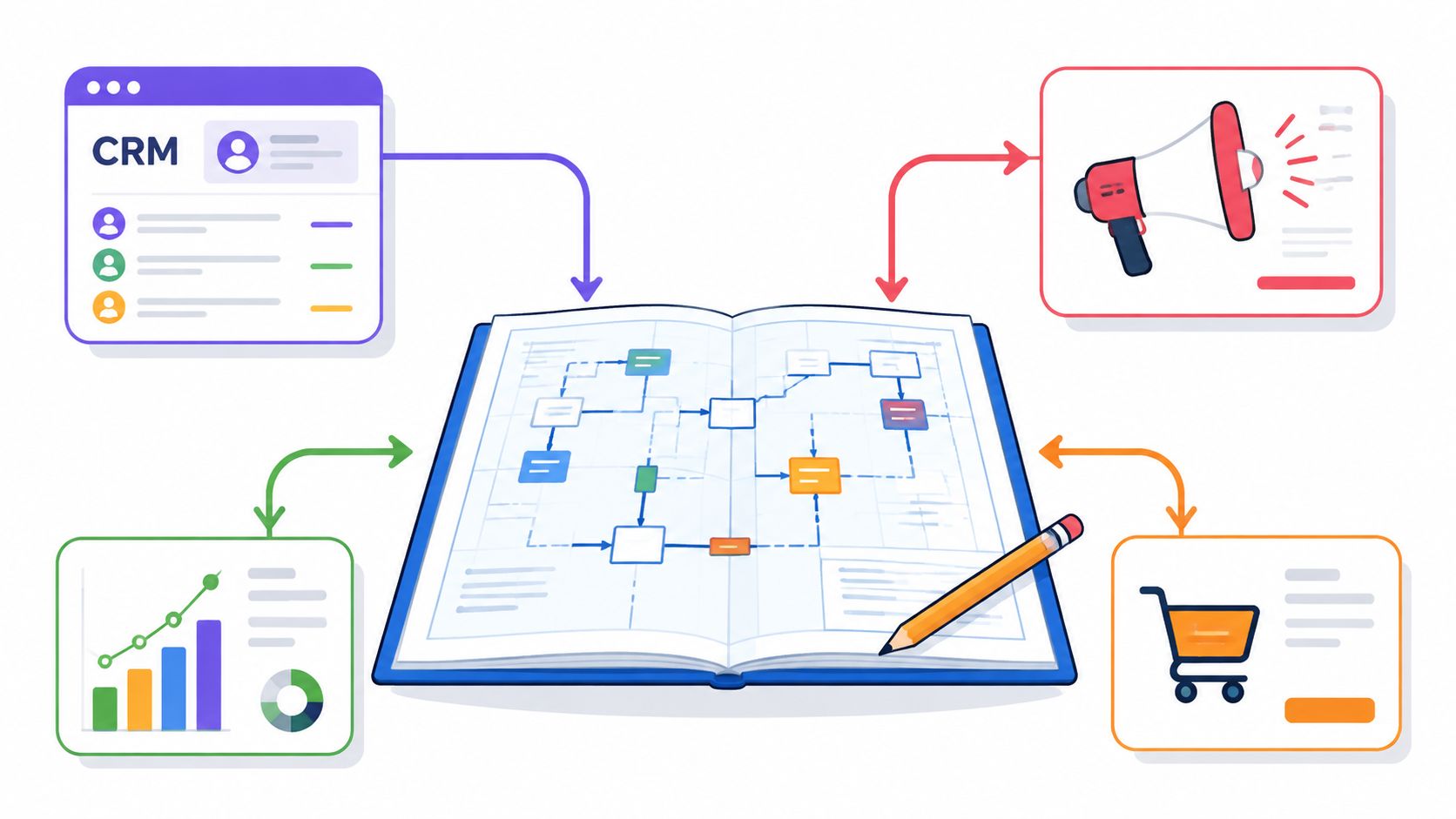
The popular advice is simple: pick a marketing automation platform, connect it to your CRM, and let the workflows do the heavy lifting. That advice has sold plenty of software and created more than a few impressive implementation decks. It also ignores the part that hurts: marketing automation integration is usually an operating-model problem before it's a connector problem.
A connector can move a lead. It can't decide who owns the lifecycle stage, which system wins when fields disagree, or whether sales trusts the record enough to act on it. Those decisions belong to people, processes, and governance. The technology only makes the decisions faster, including bad ones.
A working demo proves very little. The failure usually appears after launch, when leadership has approved the platform, records are syncing, and no one can explain why the CRM contains three definitions of “qualified.” The first month can look productive. By the sixth, marketing is exporting lists, sales is checking spreadsheets, and the reporting dashboard is decorative.
The upside is measurable. Organizations using nurture workflows with lead scoring and behavioral triggers report MQL-to-SQL conversion lifts of 30% to 50%, with a median gain of 38%, while enterprise programs report $5.44 returned for every $1 invested, and top-quartile programs reach $8.71. Yet roughly 50% to 60% of implementations fail or underdeliver, commonly because strategy and data hygiene are weak, and software is expected to compensate for missing process discipline, as detailed in 2026 marketing automation benchmark data.
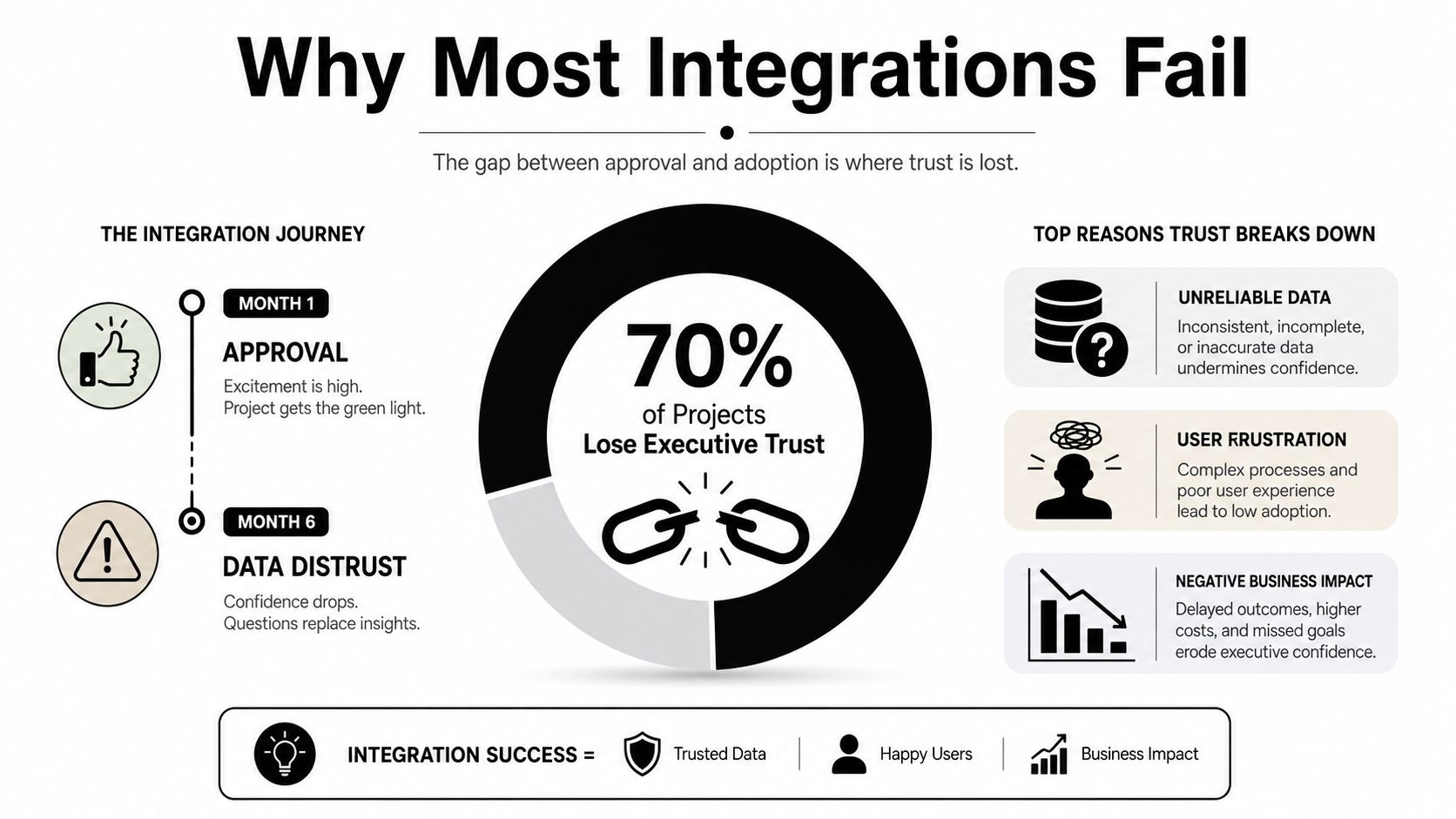
Modern marketing stacks often average 15 to 25 integrated platforms, and 40% to 60% of marketing operations time can go toward integration maintenance, according to coverage of the marketing automation ecosystem. That is the hidden tax of stack sprawl. Every added tool brings another schema, authentication method, sync schedule, permission model, and owner who must remember why it exists.
Only around a quarter of organizations have most or almost all of their martech stack meaningfully integrated, and 98% of AI-using marketers report at least one data-related barrier to personalization, according to the same source. AI does not repair fragmented data. It produces more confident output from it.
The recurring failure pattern is operational:
Practical rule: If your team cannot explain who owns a field and what happens when it changes, the integration is not designed yet.
Marketing automation became mainstream by connecting email, CRM, analytics, advertising, and sales workflows. That history explains why the modern ecosystem is so interconnected. Data exchange alone creates little value. Integration pays off when teams agree on definitions, ownership, and the action that follows each meaningful event.
Start with the data model, not the vendor's app marketplace. Write down the objects your operation uses, such as contacts, companies, opportunities, campaigns, consent records, purchases, and engagement events. Then define the minimum fields required for segmentation, routing, suppression, personalization, and measurement.
A shared model prevents the classic HubSpot and Salesforce argument where both systems claim to be authoritative. Choose a single source of truth for each field. Salesforce might own opportunity stage, HubSpot might own email engagement, Shopify might own order status, and a preference system might own consent. The important part isn't which platform wins. It's that everyone knows the answer.
Authentication comes next. Use named business or service ownership, documented permissions, and access that matches the integration's job. Don't give a connector broad administrative access because the setup guide made it convenient. Convenience has a habit of becoming an audit finding.
Map trigger events to CRM fields before building workflow branches. A form submission should identify the event, the fields it writes, the enrollment conditions, the exclusions, and the action that follows. Write the logic in plain language first:
“Enroll a net-new contact when consent is valid, the form indicates a sales inquiry, and the account isn't already in an active opportunity.”
That sentence is far more useful than a screenshot of twelve workflow boxes nobody wants to interpret during an incident.
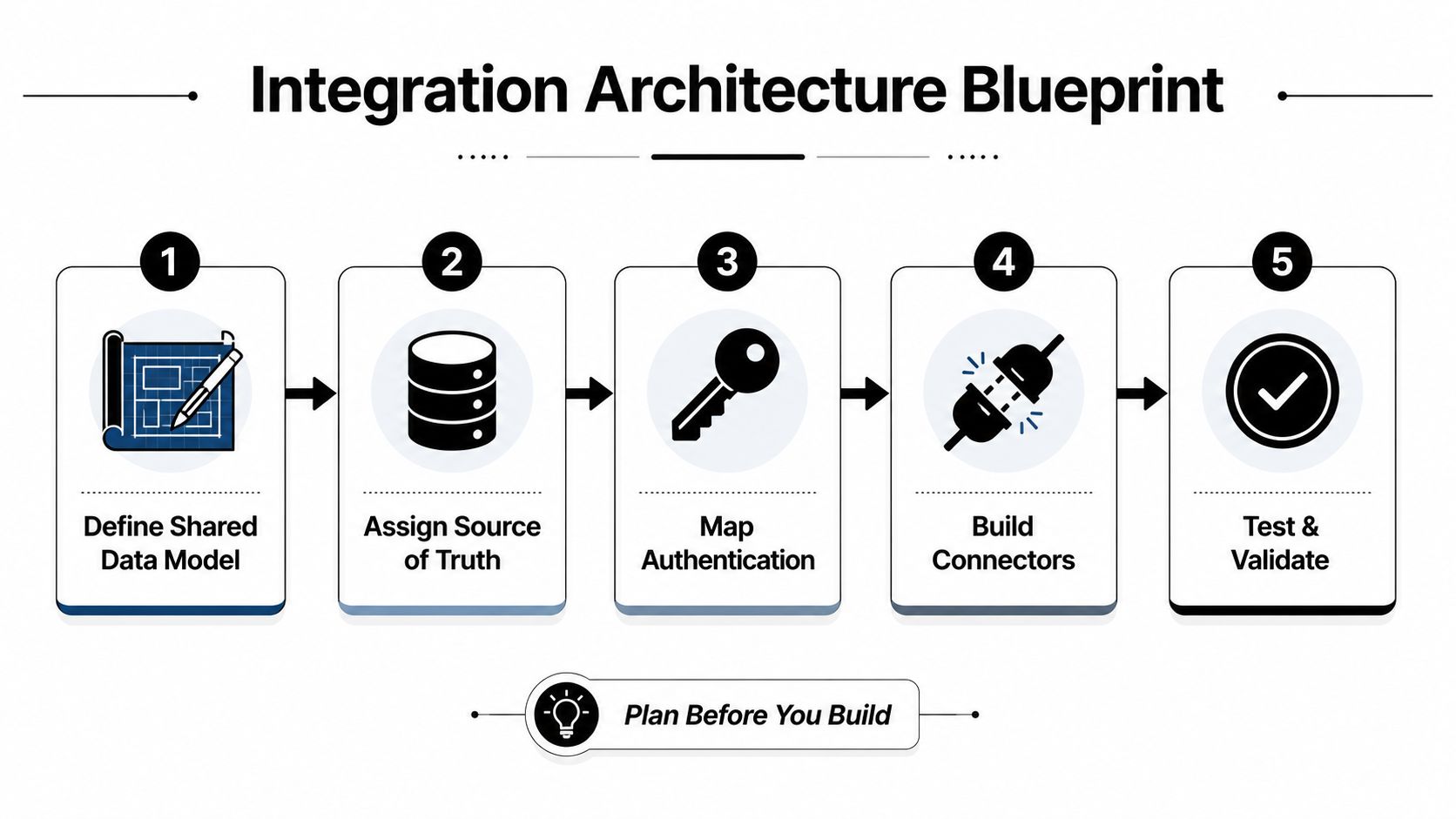
Test with one contact before scaling. Use a deliberately boring record with known values, then verify the complete path across the source form, automation platform, CRM, advertising audience, and reporting layer. One contact exposes field truncation, formatting changes, duplicate creation, incorrect timestamps, and enrollment surprises without setting your entire database on fire.
Your architecture pack should include:
For teams buying media against first-party audiences, the first-party data strategy guide is a useful companion to the architecture work. Paid media can't compensate for an audience definition that changes every time someone edits a CRM field.
The tools vary, but the connection problems repeat. A paid-media-led team usually encounters four patterns, each with a different payoff and a different place to leak data.
| Pattern | What It Unlocks | Common Failure Mode | Best Starting Point |
|---|---|---|---|
| CRM integration | Lead lifecycle visibility, scoring, routing, sales handoff, and opportunity feedback | Conflicting field ownership, duplicate records, or one-way sync that hides sales activity | Start with lifecycle stages, consent, owner, opportunity status, and response events |
| Ad platform integration | Audience suppression, qualified-lead targeting, and offline conversion feedback for platforms such as Meta and Google | Uploads use the wrong identifier, stale audiences, or conversion events fire before qualification | Begin with suppression and a small set of business-defined conversion events |
| Analytics integration | Cross-session behavior, campaign instrumentation, and a shared view of acquisition and conversion paths | UTM loss, cross-domain breaks, inconsistent event names, or dashboards that count different conversions | Define a canonical event taxonomy before connecting GA4 |
| E-commerce integration | Purchase triggers, post-purchase journeys, cart recovery, product segmentation, and retention workflows | Order status arrives late, refunds aren't handled, or customer and order objects get mixed together | Connect customer identity, order status, product data, and consent first |
CRM integration usually delivers the fastest operational payoff because it closes the gap between an action and a human owner. If a form fill enters HubSpot but sales works in Salesforce, the integration must carry enough context for the rep to act without opening five tabs and asking marketing what happened.
Ad platform connections are more powerful once the CRM can distinguish curiosity from commercial intent. Uploading every lead to Meta or Google teaches the algorithm that all leads are equally valuable. That isn't optimization. That's feeding the machine whatever fell out of the funnel.
Analytics integration deserves skepticism. GA4 can tell you what happened in the tracked experience, while the CRM can tell you whether the person became an opportunity. Neither should be forced to impersonate the other. Use a defined event contract and reconcile the systems rather than pretending their numbers will naturally agree.
E-commerce is object-heavy. A customer, an order, a line item, a refund, and a subscription status are related, but they aren't interchangeable. Poor modeling creates post-purchase messages for canceled orders and “win-back” campaigns for customers who purchased yesterday. Charming.
A launch checklist works only when it follows the dependency chain. Start with the data contract, then prove access, then test behavior, then release carefully.
Confirm the field map first. Every form field should have a CRM counterpart, an owner, an accepted format, and a rule for blanks or invalid values. Document whether the automation platform can overwrite the field or only read it. If a field has no clear use, don't move it just because the API makes it possible.
Then verify authentication and permissions in a non-production environment where available. Test reads, creates, updates, and failure responses. A successful connection test proves very little if the integration can't handle a duplicate, a missing value, or a revoked permission.
Use this sequence:
The conversion tracking resource belongs in this work, especially when paid media optimization depends on CRM outcomes rather than surface-level form submissions. Your ad platform needs a reliable definition of success before it can learn from one.
A polished sequence diagram is helpful. Field ownership, suppression logic, a fallback process, and a tested rollback are not optional. Don't spend launch week adjusting dashboard colors while an unsubscribed contact is still entering a nurture sequence.
Keep the first release narrow. Prove one source, one workflow, one CRM destination, and one measurable business outcome. Expansion should follow evidence, not the excited person who discovered the integration marketplace.
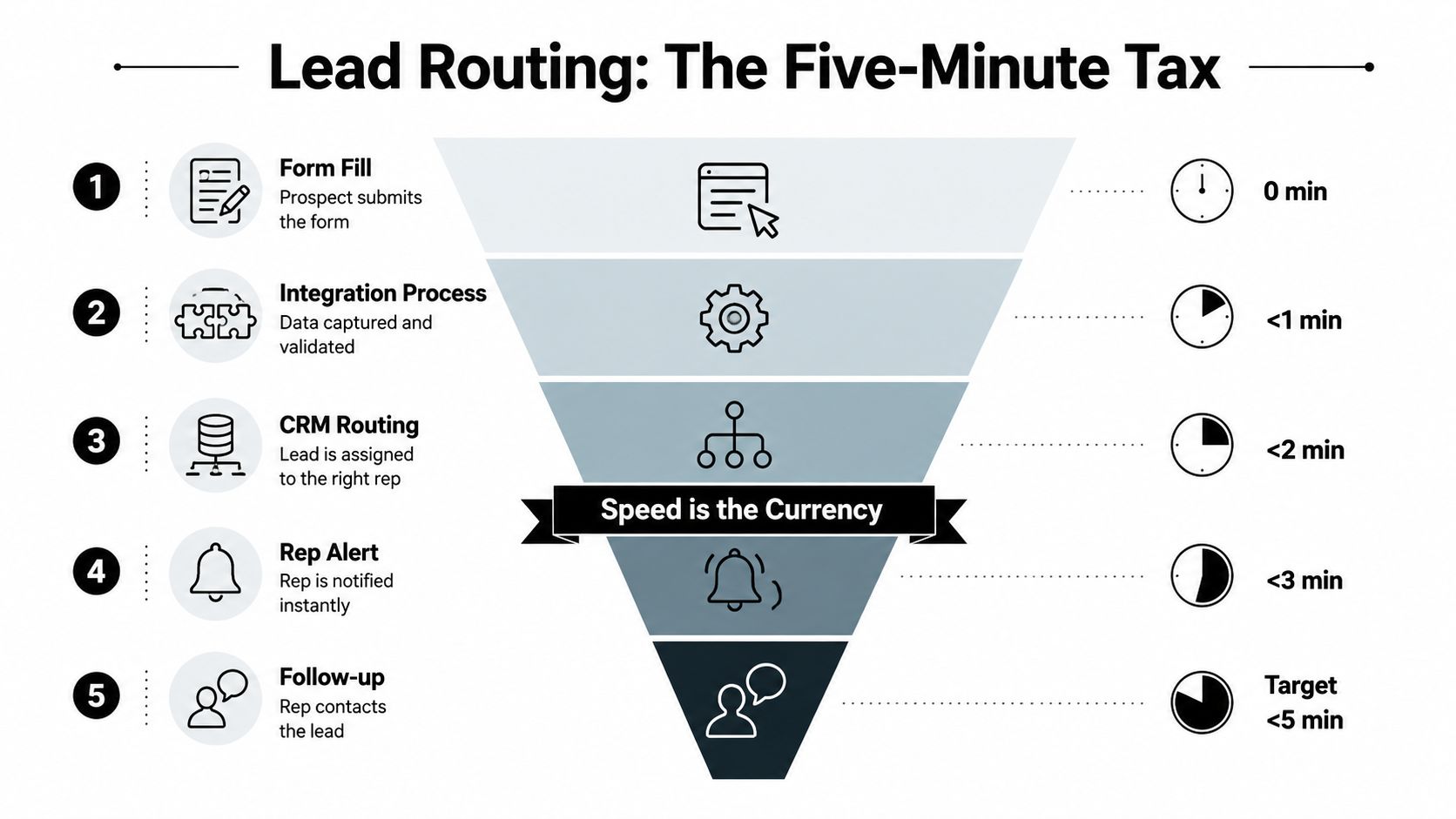
A lead-routing failure often begins with a harmless-looking form. Someone enters a work email, selects a region, chooses a product interest, and clicks submit. The form sends the record to the automation platform, the platform writes to the CRM, the CRM evaluates assignment rules, and a rep gets an alert. Every handoff can preserve context or discard it.
Field mapping comes before routing. Map region to region, product interest to product capability, company domain to account, consent status to communication eligibility, and source data to the campaign fields sales uses. If the form says “enterprise” but the CRM expects “Enterprise segment,” routing may not fail loudly. It may send the lead nowhere useful.
Round-robin works when reps have similar territories, skills, and capacity. It distributes work evenly, but it can assign a complex technical inquiry to someone who can't qualify it.
Territory-based routing fits geographic or market ownership. It requires clean location and account data, including a plan for companies that operate across regions.
Skill-based routing matches product, language, or use-case expertise. It can improve handoff quality, but the skill taxonomy needs maintenance or it becomes a museum of old job descriptions.
Account-based routing sends a lead to the team already working the account. It protects account context, though it depends on reliable company matching and clear ownership rules.
A fallback queue is the unglamorous hero. Any lead that fails a rule should land somewhere monitored, with enough information for an operations owner to repair the record and assign it. “No match” is not a routing strategy.
Response time makes this operational, not theoretical. In a study of 114 B2B organizations, 99% took longer than five minutes to respond to an inbound lead, according to lead-routing integration research. The point isn't that every business can guarantee an immediate conversation. The point is that every avoidable delay gives a warm inquiry time to cool.
A dependable flow looks like this:
Speed matters, but only after the system knows who should act.
Integration earns its keep when it connects campaign behavior to commercial outcomes. Opens and clicks can diagnose a journey, but they do not show whether that journey created qualified pipeline. The useful chain runs from source and engagement through qualification, opportunity progression, and revenue. If those stages use different definitions, the reporting may look precise while decisions remain unreliable.
Nurture workflows gain value when lead scoring and behavioral triggers receive feedback from the CRM. Earlier benchmark evidence indicates a possible improvement in MQL-to-SQL conversion, but treat that result as directional rather than promised performance. A workflow does not create lift merely by existing. The score must reflect buying intent, the trigger must arrive reliably, and sales must follow the agreed process. Otherwise, automation produces activity without improving qualification.
Meta and Google handle media delivery and platform-level optimization. GA4 records behavioral signals across the experience. The CRM should show lifecycle progression and opportunity status. The BI layer reconciles those signals for business reporting. It should not average incompatible definitions into a reassuring number.
Offline conversion uploads can connect media decisions to qualified outcomes. Define each event before sending it, then apply consistent identifiers and deduplication rules. Without that discipline, an ad platform may optimize for volume while sales absorbs the cost of poor-fit leads.
Multi-touch attribution requires restraint. A model can distribute credit across recorded touches, but it cannot repair incomplete tracking or inconsistent campaign parameters. Document the model, preserve raw campaign data, and report both influenced pipeline and conversion stages. A dashboard that labels uncertainty supports better decisions than one that hides it.
Keep these measures close to the operating review:
The integration is not the KPI. It is the operating layer behind better decisions. Its value appears when teams trust the same definitions, act on timely signals, and can trace revenue back to the conditions that produced it. When the plumbing fails, attribution becomes opinion and optimization becomes guesswork.
A production integration is a living operating system, not a finished project. Fields change, teams reorganize, vendors alter APIs, consent requirements evolve, and someone renames a picklist value because the old one “looked weird.” Without clear ownership, workflows continue running after their assumptions have expired.
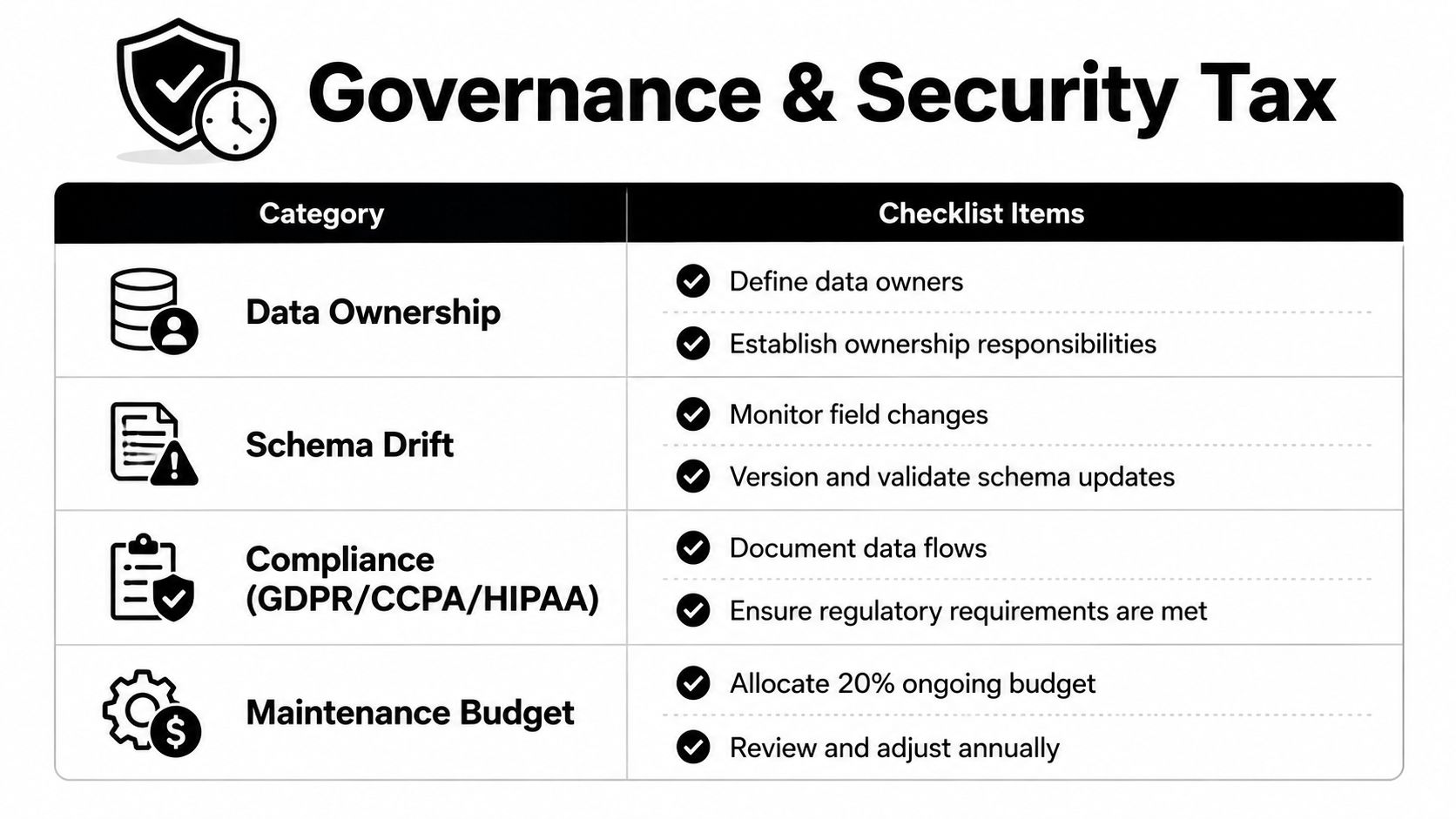
As noted earlier, maintenance can consume a large share of marketing operations capacity. The work includes monitoring sync failures, reviewing schema changes, managing permissions, resolving duplicates, validating audiences, and investigating why a report changed after nobody touched the campaign. Stack sprawl creates an operating-model problem before it becomes a technical one.
Assign a business owner and technical owner to every critical field and connection. The business owner defines meaning and acceptable use. The technical owner maintains the connection, monitors errors, and coordinates changes. One person can hold both roles on a small team, but the responsibilities still need to be explicit.
Schema drift deserves special attention. A field can remain named “lifecycle stage” while its values, population rules, or ownership change underneath it. Review field changes before deployment, maintain a versioned data dictionary, and test downstream workflows after updates. A connector that stays online can still deliver incorrect information.
Compliance belongs in the architecture, not the cleanup queue. GDPR, CCPA, and HIPAA create different obligations around consent, access, deletion, minimization, and sensitive information. Document data flows, collect only useful fields, control access by role, and make suppression and deletion behavior testable. Use the compliance checklist to turn requirements into operating tasks rather than vague legal anxiety.
Consolidate tools when two platforms perform the same core job, create overlapping records, or force the team to maintain duplicate logic. Keep specialized tools when they provide a distinct capability, the data boundary is clear, and the team can support responsible ownership.
The useful question is not whether two tools can connect. Nearly everything can connect somehow. Ask instead:
Treat maintenance as recurring operational work. Review integrations on a regular cadence, test critical workflows after platform changes, and keep a pause switch for every high-impact automation.
Governance rule: If an integration has no owner, no monitor, and no rollback path, it is an unattended liability.
The best marketing automation integration is not the one with the most connectors. It is the one teams trust, customers do not notice, and operators can repair before a small mismatch becomes a revenue problem.


